The direct answer - in plain English
When you compile C# or VB.NET code, the .NET runtime produces Intermediate Language (IL) bytecode inside a .dll or .exe. IL is surprisingly readable - free tools like ILSpy or dnSpy can decompile your production binary back to near-perfect C# in seconds.
Opaquer sits between your build step and deployment. It rewrites the IL inside your assembly, applying multiple layers of transformation so that decompilation produces meaningless, misleading, or unrunnable code - while your app itself continues to work identically.
Symbol renaming
Class, method, field, and property names are replaced with random or misleading identifiers. InvoiceCalculator.ComputeTotal() becomes a.b().
Control flow obfuscation
Loops and conditionals are restructured into opaque predicates and fake branches that confuse decompilers without altering runtime behaviour.
String encryption
Plaintext literals - API keys, connection strings, licensing tokens - are encrypted at build time and decrypted only at the moment of use.
Anti-tamper & anti-debug
Runtime checks detect modified assemblies or attached debuggers and respond with configurable actions: crash, misbehave, or phone home.
Resource & metadata protection
Embedded resources and assembly metadata are stripped or encrypted, removing build paths, developer names, and version hints.
Build pipeline integration
Runs as an MSBuild target, a CLI tool, or a GitHub Actions step - no manual GUI step needed in CI/CD.
What obfuscation actually looks like
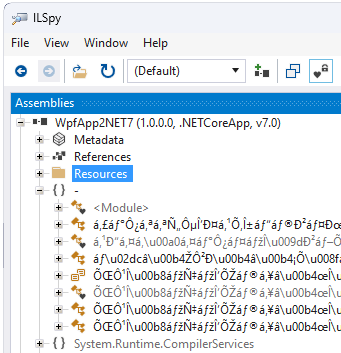
Here's a real-world before/after comparison of a .NET licensing check function, as it appears in a decompiler before and after Opaquer processes the assembly.
// Easily decompiled with ILSpy or dnSpy
public class LicenseValidator
{
    private const string SecretKey =
        "SK-PROD-2024-XK9";

    public bool IsLicenseValid(
        string licenseKey)
    {
        if (licenseKey == null)
            return false;

        return licenseKey
            .StartsWith(SecretKey)
         && licenseKey.Length == 24;
    }
}// Decompiler cannot recover meaning
public class a2F
{
private static string b7x()
{
return ɑ.ʘ("\u0041\u2060\u200B",
0x3F ^ 0x1A);
}
public bool ɑb(string ʘ9x)
{
if (ʘ9x == null) goto IL_002F;
IL_0010:
if (!ʘ9x.StartsWith(b7x()))
goto IL_002F;
return (ʘ9x.Length ^ 0x18) == 0;
IL_002F: return false;
}
}The obfuscated version is functionally identical - your end-users notice nothing. Attackers see noise. Learn more in the tutorial ->
Opaquer in action
Opaquer ships with a GUI for one-click protection and a full CLI for automated build pipelines.
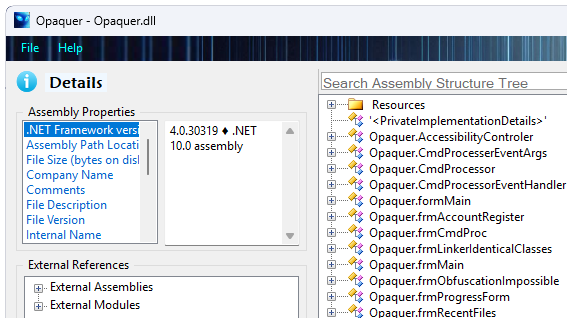
.dll or .exe, pick your protection rules, and click Obfuscate. Takes seconds on most assemblies.
How Opaquer compares
Feature comparison: Opaquer vs. common alternatives
✅ Full support ⚠ Partial ✗ Not available
| Feature | Opaquer | ConfuserEx | Dotfuscator CE | Manual IL editing |
|---|---|---|---|---|
| Symbol renaming | ✅ | ✅ | ✅ | ⚠ |
| Control flow obfuscation | ✅ | ✅ | ⚠ Basic | ✗ |
| String encryption | ✅ AES-256 | ⚠ Custom | ✗ | ✗ |
| Anti-tamper / anti-debug | ✅ | ⚠ | ✗ | ✗ |
| CI/CD pipeline integration | ✅ CLI + MSBuild | ⚠ CLI only | ⚠ VS plugin | ✗ |
| Support across .NET 6 to .NET 10 | ✅ | ⚠ Community | ⚠ Paid tiers | ⚠ |
| WPF encryption support | ✅ | ✗ | ✗ | ✗ |
| Commercial support SLA | ✅ | ✗ | ✅ (paid) | ✗ |
Opaquer plan comparison
| Feature | BASIC Free |
PRO $189.99 |
ENTERPRISE $489.99 |
|---|---|---|---|
| Private Names Obfuscation | ✅ | ✅ | ✅ |
| Public Names Obfuscation | ✅ | ✅ | ✅ |
| String values encryption | ✅ | ✅ | ✅ |
| Lightweight Control Flow obfuscation | ✅ | ✅ | ✅ |
| Command Line Interface | ✗ | ✅ | ✅ |
| High-Intensity Control Flow | ✗ | ✗ | ✅ |
| Team Deployment | ✗ | ✗ | ✅ |
| Internet-Free Build Server Support | ✗ | ✗ | ✅ |
| Concurrent developer seats | 1 | 1 | Unlimited |
Frequently asked questions
Everything developers commonly ask before adopting Opaquer.
Does obfuscation affect my app's performance?
If you rely on the command-line interface, it is essential to ensure that the CLI command references this configuration file so that your string-exclusion rules are consistently applied during automated or CI/CD builds.
Will Opaquer break reflection, serialization, or dependency injection?
Is obfuscation the same as encryption? Is my code 100% safe?
Does it work with .NET 6, 7, 8, 9, and 10?
Can I integrate Opaquer into my Azure DevOps pipeline?
Do I need the source code to obfuscate an assembly?
.dll or .exe files and does not require source code. This means you can also protect third-party assemblies you have a license to distribute, as long as their license permits modification for distribution purposes.
How does the licensing work? Is it per-developer or per-project?
The BASIC tier is completely free-forever for both personal and commercial use by a solo user.
ENTERPRISE licenses are site-wide, allowing unlimited installations across all PCs within the organization. View the full pricing page ->
Is the license valid permanently, or is there an annual renewal fee? If renewal is required, what is the price.
Your license is perpetual and valid on one PC for all non-ENTERPRISE editions.
Future upgrades are optional and available at a 70% discount (you pay 30% of the current price).
Your Rustemsoft license also includes:
• Six months of unlimited updates (minor and major).
• Six months of beta access with permanent registration rights.
• Six months of free email support.
After six months, upgrades for any Rustemsoft product remain 30% of the current license price.
How can I receive technical support after the initial six‑month period? Are there any fees?
For major updates or ongoing full support beyond that period, Rustemsoft LLC requires purchasing a Opaquer .NET Obfuscator version upgrade, priced at 30% of the current software license fee.
Where can I learn more and get started quickly?
Ready to protect your .NET code?
Download Opaquer .NET Obfuscator. Basic Edition is free forever.